Explanation
Trax compared with Temporal and Durable Functions
Checked on 2026-11-05 against the Temporal and Microsoft Learn docs. Corrections are welcome as issues.
Temporal is a durable execution platform: a server cluster, or Temporal Cloud, that your
workers connect to. Workflow code is replayed against a recorded event history, so it has to be deterministic, and
side effects go in activities that are retried by default.
Durable Functions is the
same idea as an Azure Functions extension, and the
Durable Task SDKs are its
self-hosted form, backed by the Azure Durable Task Scheduler.
Trax works differently. It does not replay your code. A train is ordinary .NET code that runs from the top, or from
the last checkpoint it declared, and every run is recorded as a row in your own database. Anything that has to wait
for days, or for a person, is a state machine whose state is stored between events.
What you run
| Trax | Temporal | Durable Functions and the Durable Task SDKs |
|---|
| What you operate | Packages in your ASP.NET Core app, and a database | A Temporal server cluster or Temporal Cloud, and your workers | An Azure Functions app, or your app and the Durable Task Scheduler |
| Storage | PostgreSQL; SQLite for a single process; in-memory for tests | Cassandra, PostgreSQL or MySQL; SQLite for development | Durable Task Scheduler (recommended), Azure Storage, MSSQL, Netherite (ends 2028); the SDKs use the Durable Task Scheduler only |
| Off Azure, or air-gapped | Yes | Yes, self-hosted | Durable Functions on MSSQL only |
| Languages | C#; machines also run in TypeScript | Go, Java, Python, TypeScript, .NET, Ruby, PHP and more | .NET, JavaScript and TypeScript, Python, Java, PowerShell |
| .NET | .NET 10 only | .NET 6 and later | The isolated worker model (in-process support ends 2026-11-10) |
| Licence | MIT | MIT; Temporal Cloud is paid | SDK MIT; the Durable Task Scheduler is a paid Azure service |
How work survives a crash
| Trax | Temporal | Durable Functions |
|---|
| Model | Each run recorded; a train can declare Checkpoint<TState>(), and a resumed run skips to it | Event history and deterministic replay | Event sourcing and replay |
| Rules on your code | None for trains | Strict: Workflow.UtcNow, Workflow.DelayAsync, no Task.Run | Strict: CurrentUtcDateTime, NewGuid(), no I/O in orchestrators |
| Unit of side-effecting work | A junction in a train | An activity | An activity |
| Retries | The whole run, for scheduled work: 3 retries by default, 5 minutes doubling to 1 hour, then a dead letter. A run queued on demand is not retried | Per activity: unlimited attempts by default, 1 second doubling to 100 seconds | Per activity or sub-orchestration, when you set a retry policy |
| After the last retry | A dead letter, requeued from the operations console, GraphQL or a terminal; the requeue replays the original's recorded decisions | Retries until a timeout or a non-retryable error | The orchestration stays Failed; rewind is in preview |
| Repeated side effects | A rerun repeats junctions after the checkpoint. IdempotentEffect and RunsOnce record a result once and pass the same key on a repeat | Activities may run more than once; make them idempotent | Activities run at least once; make them idempotent |
| Resume a failed run part way | Resume, or resume from a chosen checkpoint, from the console or GraphQL | Reset: a new execution from a chosen point in the history | Restart from the start in the dashboard; rewind is in preview |
| Parallel work | Parallel: a fixed set of named branches, each in its own scope; one failure cancels the rest by default | Workflow.WhenAllAsync over any number of activities, up to 2,000 pending | Fan-out and fan-in over any number of activities |
| Cancel a running run | From the console, GraphQL or code; it stops at its next junction on any host and is recorded Cancelled | Cancel (an activity sees it only if it heartbeats), or terminate | Terminate, suspend, resume |
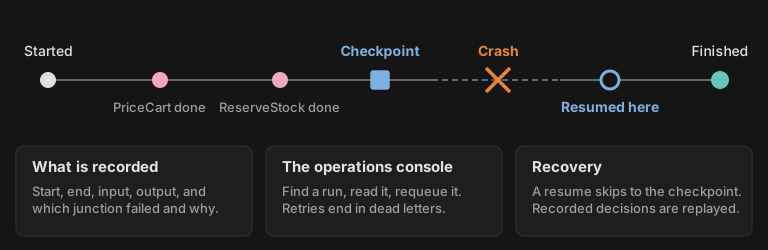
Temporal and Durable Functions make every await in a workflow durable. Trax makes the points you declare durable:
checkpoints in a train, and states in a machine. Junctions between a checkpoint and a crash run again, so make the ones
that call other systems safe to repeat.
Concurrency
| Trax | Temporal | Durable Functions |
|---|
| One run at a time per record | Queued runs with the same subject key run one after another; the rest wait in the queue | One open execution per workflow id; a second start fails or returns the open one | A singleton orchestration: check the instance id, then start (Microsoft documents a race) |
| Caps on concurrent runs | Per train, per caller and global caps for direct runs; global and per-group caps for queued work | Slot suppliers per worker | Per-worker settings for activities and orchestrators |
Decisions and models
| Trax | Temporal | Durable Functions |
|---|
| A model in the flow | A Switch, Gate or Scale step asks a typed question that a decider answers: a rule, a lookup or a model. Every track is declared and checked at startup | An OpenAI Agents SDK integration (Python): the agent loop runs in a workflow and model calls run as activities | A Durable Task extension for Microsoft Agent Framework: durable agent sessions |
| A retry and the model | A retry or requeue replays the recorded answers, within 24 hours by default; "ask afresh" skips the replay | Completed activities are not repeated during replay | Completed agent calls are not rerun on recovery |
| Try a new model beside the live one | Shadow deciders answer alongside the live one, and each answer is recorded with whether it agreed | Not found | Not found |
| Docs for coding agents | Agent skills published with each release, and llms.txt | llms.txt | Not found |
Waiting, and input from outside
| Trax | Temporal | Durable Functions |
|---|
| Long waits | A machine state, not a train | In workflow code | In orchestrator code |
| Durable timers | A machine state's After(...), fired by the server, up to 366 days | Workflow.DelayAsync | CreateTimer |
| Input to a running flow | A machine event, served as a typed GraphQL mutation. A running train takes no input | Signals and updates | WaitForExternalEvent |
| Reading live state | A machine's get query and change subscription; GraphQL subscriptions for a train's state changes and junction events | Queries | Custom status and the instance status API |
| Children | A state invokes a train or spawns a child machine; leaving the state cancels it | Child workflows | Sub-orchestrations |
| New code under running instances | A machine's Version and MigrateFrom migrate stored snapshots forward; a checkpoint refuses a resume if the chain changed | Worker Versioning or patching | Orchestration versioning, side by side, or stop and restart |
Scheduling
Trax's scheduler is a large part of what it is for: recurring and one-off runs of trains, schedules that depend on
each other, caps and priorities across groups of them, and retries that end in a dead letter an operator can requeue.
Temporal has Schedules. Azure has the Functions
timer trigger, eternal
orchestrations, and interval
schedules in the
Durable Task Scheduler's .NET SDK.
| Trax | Temporal Schedules | Durable Functions and the Durable Task Scheduler |
|---|
| What can be scheduled | Cron with 5 or 6 fields, intervals (Every.*), a one-off after a delay, or a run that follows another | Intervals with an offset, calendar expressions, cron; several in one schedule | Timer: NCRONTAB cron. Durable Task Scheduler: an interval only. Eternal orchestration: your own timer |
| Time zone | UTC only | UTC by default; another zone can be named | UTC by default; WEBSITE_TIME_ZONE on Windows and Linux Premium or Dedicated |
| Jitter | Variance(...) | Jitter | Not found |
| Exclusions | Days of the week, dates, date ranges, daily time windows | Calendar expressions can leave times out | Not found |
| Overlap | A schedule never overlaps itself: it is skipped while a run is queued or running | Six policies: skip, buffer one, buffer all, cancel other, terminate other, allow all | Timer: one instance, no new trigger while one runs. Eternal: never overlaps |
| Missed runs | FireOnceNow or DoNothing, past a threshold, per schedule | A catchup window | Timer: IsPastDue on a late run. Durable Task Scheduler: StartImmediatelyIfLate |
| Start, end and run limits | No | Start and end time, a limited number of runs | Durable Task Scheduler: start and end time |
| Backfill | No | Yes | No |
| Pause and edit | Enable and disable a schedule or a whole group; edit its cron, interval, priority, retries and timeout from code or the console | Pause with a note, pause on failure, update | Durable Task Scheduler: pause, resume, update. Timer: redeploy or change an app setting |
| Run now | Trigger a schedule now or after a delay, or a whole group | Trigger | Timer: a manual HTTP call |
| Schedules that depend on schedules | Yes: a child runs after its parent succeeds, cycles are refused at startup, and a parent can decide at runtime which dormant children run and with what input | Not documented: a schedule is independent of other workflows | No |
| Many at once | ScheduleManyAsync, IncludeMany | Not found | Not found |
| Concurrency caps | A global cap, and a cap per group of schedules (approximate with several hosts) | Per worker and per task queue; no cap per group of schedules | Not covered here |
| Priority | 0 to 31 per schedule or group; dependents get a boost | Task queue priority 1 to 5, and fairness keys | Not found |
| One at a time per record | Queued runs that share a subject key run one after another | Not covered here | A singleton orchestration with a fixed id |
| When a scheduled run fails | Retried with backoff, resumed from its last checkpoint, then a dead letter for an operator | No retry unless the workflow sets a retry policy; optional pause on failure | Timer: no retry unless you add a retry policy. Eternal: ends as Failed and does not restart |
| Where it runs | The host, or remote workers over HTTP, SQS or AWS Lambda | Workers polling task queues | Functions scale-out; Durable Task Scheduler workers |
| From the UI | The operations console: trigger, enable, disable, cancel, edit, requeue dead letters | Web UI and CLI | The Azure portal; the Durable Task Scheduler dashboard |
Temporal's Schedules are the more flexible clock: time zones, overlap policies, backfill and run limits. Trax's
scheduler is the more complete job system: schedules that depend on each other, caps and priorities across groups,
dead letters, and an operations console built around them.
State machines and clients
| Trax | Temporal | Durable Functions |
|---|
| State machine | Declared states, events, guards, timers, invoked trains and child machines | None built in: a workflow with signals | Entities: keyed state, one operation at a time, no declared transitions |
| A browser drives it | Yes: a typed API per machine; the browser predicts with the same machine, and the server applies the move | Through a backend you write | Through a function you write; the built-in HTTP API needs a system key that must not reach the client |
| Who may send an event | Declared per event, checked by the server; a served machine with an undeclared rule refuses to start | The Write permission on a namespace covers signalling any workflow; finer rules need a custom authorizer | A function key or system key; Durable Task Scheduler roles per scheduler or task hub |
| Who may start a run | [TraxAuthorize] or [TraxAllowAnonymous] on each served train; a served train with neither stops the host | The Write permission on a namespace | A function key, or the trigger's authorization level |
| Typed clients | trax client writes typed TypeScript or C# clients from the operations the app sends; .NET apps drive machines through Trax.StateMachine.Client | Not found | Not found |
Observability
| Trax | Temporal | Durable Functions |
|---|
| UI | The operations console: runs, dead letters, schedules, machines. Cancel, requeue (replaying or re-asking decisions), resume from a checkpoint, and bulk actions over a filter | Web UI: event history, signal, reset, terminate | Durable Task Scheduler dashboard, the Azure portal |
| From a terminal or a script | trax-console, with a JSON lines mode for scripts and agents | The temporal CLI, with JSON output | Not found |
| History | Each run's input, output, timing, failure and steps; each decision with its decider; log lines tied to the run; a machine's transitions with who made them | Every event of every execution | Every history event, purgeable |
| Pushed events | Lifecycle hooks, GraphQL subscriptions, SignalR to browsers, RabbitMQ between processes | Not found | Lifecycle events to Event Grid |
| Sensitive data | Members marked [TraxSensitive] are masked when inputs and outputs are stored | A payload codec encrypts payloads before they reach the service | Not found |
| Tracing | No OpenTelemetry spans for runs; a span per Parallel branch, and meters for machines, audit, persisted operations and change signals, through System.Diagnostics | An OpenTelemetry extension, and metrics | Distributed tracing through Application Insights |
| Size limits | No cap on a run's history; caller input 256 KiB, a checkpoint 1 MiB, a machine snapshot 64 KiB by default | 51,200 events or 50 MB per execution | 1 MB payloads on the Durable Task Scheduler |
Developer experience
| Trax | Temporal | Durable Functions |
|---|
| Caught before the first run | The host refuses to start when a chain can never run or a served train has no authorization rule | A replayer runs recorded histories against new code to find non-determinism | Some violations throw at run time; Microsoft says not to rely on it |
| Testing | A junction is a plain class; a train runs on the in-memory provider; the whole host runs under WebApplicationFactory; architecture-guard packages. No test clock for machine timers | A time-skipping test environment, an activity environment, a replayer | A mocked orchestration context; an in-memory test host in the SDKs |
| Start a project | dotnet new trax-api, trax-scheduler or trax-hub, each with a test project | temporal server start-dev and an SDK | func init and func new |
When to choose Temporal
- Workflows run for months, or have thousands of steps, and you want every
await durable rather than the points you
declare.
- You need per-activity retries, heartbeats and timeouts. Trax retries the whole run.
- Workflows span languages, or teams in different languages call each other's workflows.
- You want the complete event history of every execution to debug from.
- Schedules need time zones, overlap policies or backfill.
- You can run a Temporal cluster or pay for Temporal Cloud, and you accept the determinism rules.
- You are on .NET 6 to 9.
When to choose Durable Functions
- You are on Azure already and want serverless orchestration that scales to zero, with Functions triggers and
bindings.
- You want Application Insights tracing and Azure role-based access with no extra setup.
- Your database is SQL Server. Trax has no SQL Server provider.
When to choose Trax
- People drive the process through a browser or an API, and the server has to decide, per event, who may do what.
- You want the page to know the next valid moves from the same machine the server runs.
- You schedule a lot of work: hundreds of schedules in groups with their own caps and priorities, schedules that wait
on each other, and failures that end in a dead letter an operator requeues from the console.
- A rule or a model chooses the branch, every branch is checked at startup, and a retry reuses the recorded answer
instead of asking the model again.
- Operators resume, cancel or requeue failed runs from a browser or a terminal, with no separate service to run.
- You want plain .NET code with no determinism rules, every run recorded in your own Postgres, and no cluster or cloud
service to run beside your app.