Trax in five minutes
This page explains what Trax is for, with no prior knowledge of it. Each section is one idea and one picture, and they build on each other, so read it top to bottom. The example throughout is a shop's checkout, the same one the book builds.
The pictures use one colour per idea, the same everywhere: teal for states, lavender for moves, amber for guards, blue for trains, pink for junctions, and orange for failures.
Many kinds of clients touch the same process
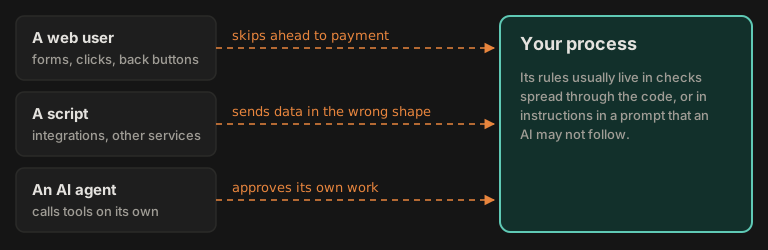
A checkout goes from cart to address to payment to a placed order, in that order. A refund needs a manager. An invoice has to add up. Every process has rules like these, and more and more different clients touch the same process: people in a browser, scripts and other services, scheduled jobs, and now AI agents that call tools on their own. Any of them can try something it should not.
In most systems the rules that stop them are checks spread through the code, and for an AI agent, instructions in a prompt it may not follow.
The idea
Define the process once, on the server. Let anything drive it. Check every move.
Trax is a .NET framework for enforced workflows. You describe the process and the work inside it in C#, Trax serves it to whatever clients you have, and the server applies every rule itself, whoever is asking.
What a state machine is
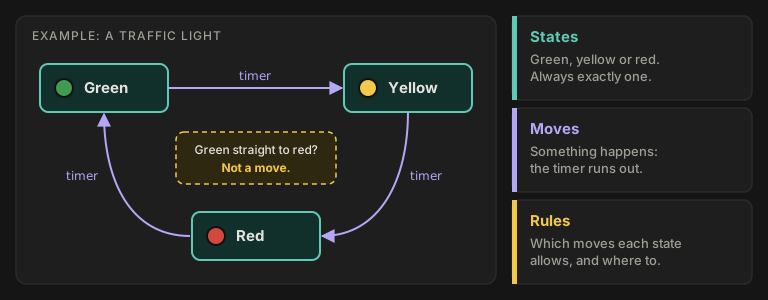
The rest of this page builds on one idea. A state machine is anything that is always in exactly one state, and changes only when an allowed move happens. A traffic light is green, yellow or red, never two at once. When the timer runs out it moves to the next light, and some moves do not exist at all: it cannot jump from green straight to red. States, moves, and rules about which moves each state allows: that is the whole idea.
A checkout works the same way, with more states. Trax lets you write those rules once and has the server enforce them.
Think of it as a railway
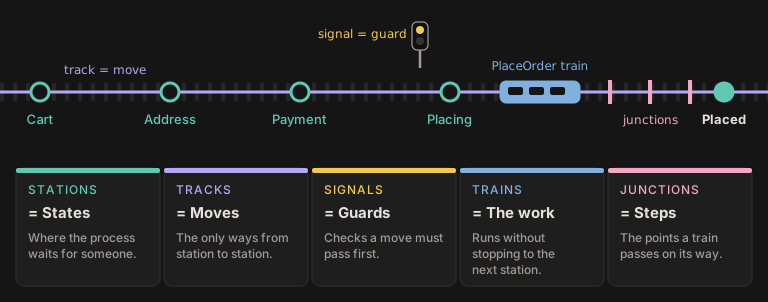
Trax already uses railway words, and the picture holds:
- Stations are states: where the process waits for someone to act.
- Tracks are moves: the only ways from one station to the next. There is no track from Cart straight to Placed.
- Signals are guards: checks a move must pass before it is allowed.
- Trains are the work, such as reserving stock or taking a payment. A train never waits: it leaves a station and runs without stopping to the next one. Not every move needs a train; here only Placing starts one.
- Junctions are steps: the points a train passes on its way. If you know railways, note that in Trax a junction is a step on a train's route, not a place where tracks split.
A train does the work
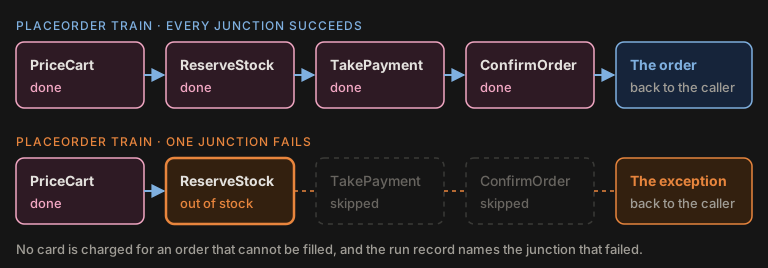
A train is one operation written as a short chain of small, typed steps called junctions. When every junction succeeds, the caller gets the result. When one fails, the rest are skipped and the caller gets the exception. Here no card is charged for an order that cannot be filled. Every run of a train is recorded, so the failure can be found and read later.
How states and trains work together
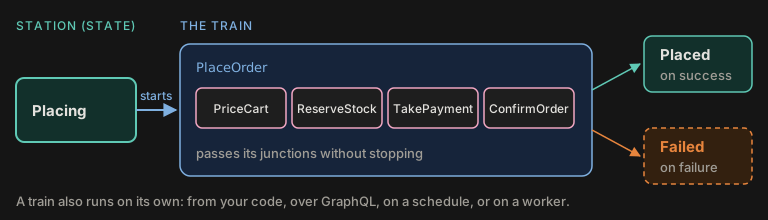
Reaching the Placing station starts the PlaceOrder train. The train runs its junctions without
stopping and returns a result, and the result decides where the checkout arrives: Placed if it
succeeded, Failed if not.
A train is also useful on its own, for anything that runs from start to finish: from your own code, as a GraphQL mutation, on a schedule, or on a worker in another process. Plenty of applications use only trains. Train or machine helps you choose.
The checkout as a map and a table
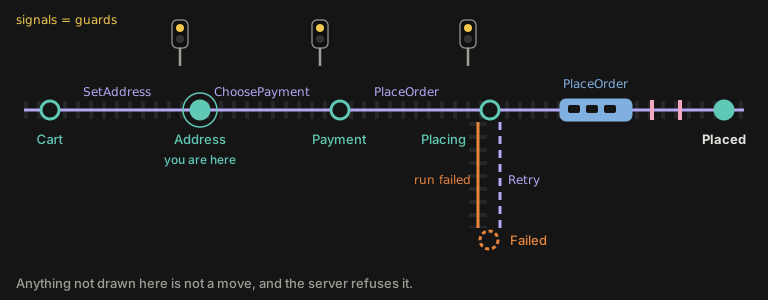
The map is how you explain the checkout to anyone. The table is what a developer defines: every row is a piece of track, and anything not in it is not a move, so the server refuses it.
| From | Move | Guard or rule | To |
|---|---|---|---|
| Cart | SetAddress | something is in the cart, and an address is given | Address |
| Address | ChoosePayment | a way to pay is given | Payment |
| Payment | PlaceOrder | the caller is a customer | Placing |
| Placing | the PlaceOrder train succeeds | Placed | |
| Placing | the PlaceOrder train fails | Failed | |
| Failed | Retry | the caller is a customer | Placing |
The customer is at Address, so the only way forward is ChoosePayment, and only with a way to pay.
The book's machine also has Back moves, a move that edits the cart, and a timer that abandons a
cart left alone for two hours; the picture leaves them out to stay small.
What it looks like in C#
This is the same checkout in the book's code, with some lines left out:
From Trax.Samples/book/Shopfront/Shopfront.Core/Machines/Checkout/CheckoutMachine.cs
m.In(CheckoutState.Address)
// ...
    .On(CheckoutTrigger.ChoosePayment)
    .AnyAuthenticated()
    .WithInput<PaymentInput>()
    .When(Input((PaymentInput i) => i.PaymentToken).NonEmpty())
    .Because("Choose how to pay.")
// ...
    .To(CheckoutState.Payment);

m.In(CheckoutState.Payment)
// ...
    .On(CheckoutTrigger.PlaceOrder)
    .Requires(Roles.Customer)
    .To(CheckoutState.Placing);
// ...
m.In(CheckoutState.Placing)
    .Context<CheckoutContext>()
    .Invokes<IPlaceOrderTrain, PlaceOrderInput, PlaceOrderOutput>(OrderFor)
    .OnDone(
        CheckoutState.Placed,
// ...
    .OnFailed(CheckoutState.Failed)
    .OnCancelled(CheckoutState.Failed);

m.In(CheckoutState.Failed)
    .Context<CheckoutContext>()
    .On(CheckoutTrigger.Retry)
    .Requires(Roles.Customer)
.To(CheckoutState.Placing);InandToname the state a move starts from and the state it leads to.Onnames a move a client may send in that state.AnyAuthenticatedandRequiressay who may send it.Whenis the guard, andBecauseis the reason the client gets back when it fails, written next to the rule.Invokesnames the train a state runs, andOnDoneandOnFailedwhere its result leads.
Author and serve a machine goes through every part.
How the server checks a move
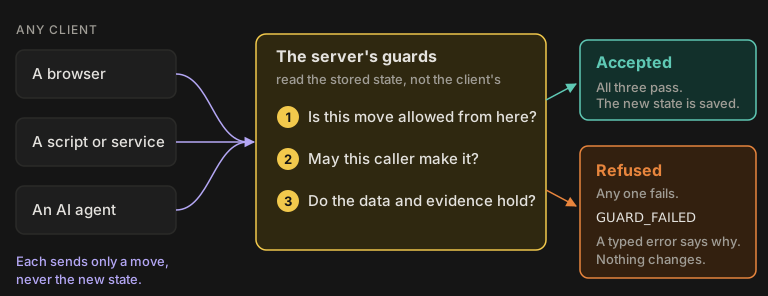
A client never tells the server "this order is now paid". It sends a move, such as PlaceOrder, and
the server works out the result from the state it stored, not from anything the client claims. It
checks three things:
- Is this move allowed from the current state? If not,
NO_TRANSITION. - May this caller make it? Nothing is served until a rule says who may, so if not,
FORBIDDEN. - Do the data and evidence hold up? If not,
INVALID_INPUTorGUARD_FAILED, with the reason.
If all three pass, the new state is saved. If any one fails, nothing changes and the client gets a typed error saying which rule it broke. Result codes lists them all.
Every client gets the same rules
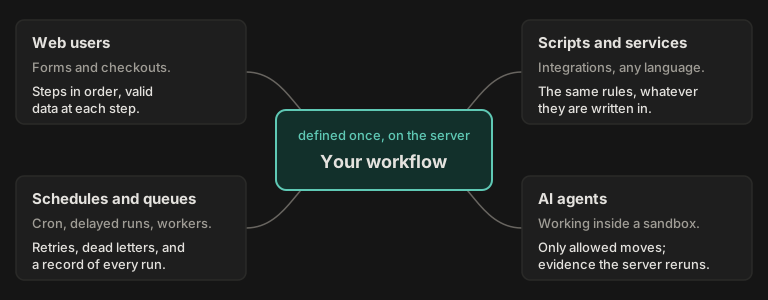
Because the rules live on the server, every kind of client gets the same ones. People in a browser get the steps in order and their input checked. Scheduled and queued work gets retries, dead letters and a record of every run. Scripts and services call the same API in whatever language they are written in, and the rules hold for them too, including the ones their language cannot check. AI agents can only make the moves you declared, and the server reruns their evidence.
Where Trax sits around an AI agent
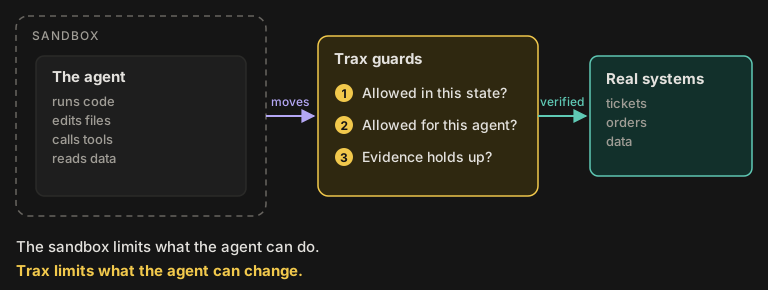
AI agents are the most demanding client. Two layers do two different jobs. A sandbox limits what an agent can do: it can run code and make a mess, but only in its own box. Trax limits what it can change: its only way out is a small set of declared moves, each checked against the state, the agent's role, and evidence the server checks itself rather than takes on the agent's word. Most agent setups have the first layer and improvise the second with instructions in a prompt.
The Board sample
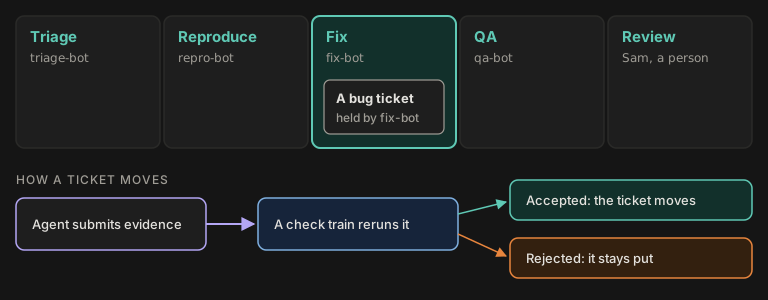
Board is a Trax sample where bots move bug tickets through lanes. Four scripted bots and one person each own a lane, with keys of their own. A bot never moves a ticket itself: it submits evidence for its lane, a check train on the server reruns that evidence against the rules, and only the train's verdict moves the ticket. The last lane belongs to a person, so human sign-off is just another lane with a role. The bots are scripted, not language models, but they talk to the server the way an AI agent would.
What an agent cannot do there, and what it gets back:
| The agent tries to | The server answers | Because |
|---|---|---|
| Claim a ticket another agent holds | ALREADY_CLAIMED | a claim needs a ticket nobody holds |
| Approve its own fix | FORBIDDEN | only a reviewer may approve |
| Close a ticket as not reproducible too early | GUARD_FAILED | closing needs at least two cases the server ran |
| Claim work when none is waiting | NOTHING_TO_CLAIM | there is no ticket in its lane |
An agent cannot report its own test results either: the cases on record are written only by the server's check.
Every run is recorded
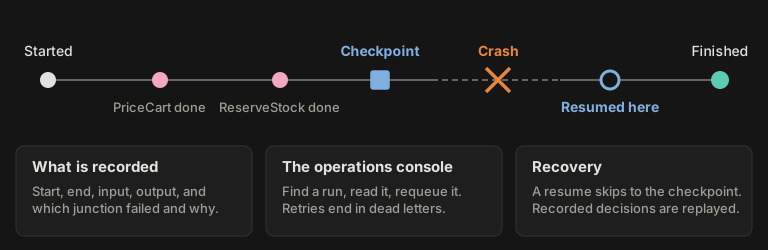
Every run is a row in your own Postgres (or SQLite) database: when it started, how it ended, its input and output, and which junction failed with what. The operations console lists them, so an operator can find a run, read it and requeue it. A train can save a checkpoint, so a failed run resumes from there instead of from the start, and answers it already recorded are replayed rather than asked again, which matters when a model gave them. The Recovery sample shows it live.
Explaining Trax to someone else
The idea is the same for everyone; only the words change. Start at the top and go further only if they ask.
| To | Say |
|---|---|
| Anyone | Trax makes sure a process happens in the right order, by the right people, with nothing skipped, whether a person, a script or an AI is doing the work. |
| Engineers | You define a workflow once as a state machine. Any client can drive it, but the server checks every move and rejects bad ones with clear errors. |
| Agent builders | Each agent works through its own state machine. It can only send the moves you declared, and the server reruns its evidence before anything advances. |
| .NET developers | State machines and typed trains in C#, transitions the server recomputes, and every run recorded in Postgres. Add the scheduler, GraphQL and workers when you need them. |
Where to go next
| You want to | Read |
|---|---|
| Try it now | Quick start, one app from an empty folder |
| Learn it properly | The Trax book, a shop built one feature per chapter |
| See it working | Samples, complete applications you can run |
| Compare it with Hangfire and Quartz.NET | Trax compared with Quartz.NET and Hangfire |
| Look up a word | Glossary |
| See everything it does | What Trax does, every capability and where it is taught |
SDK Reference
Machine | Rules | Result codes | ServiceTrain